Need help with visa, Emirates ID, labour or business setup typing? Talk to Bab Al Zahiah Typing Center. WhatsApp us →
How to Check Status Online

GDRFA Dubai Visa Status Check: Complete Guide

Last updated: 22 July 2026

Dubai runs its own residency system. If your visa, entry permit, or sponsorship file was issued in Dubai, GDRFA Dubai — not ICP — is where you track it. Here is the simple way to do it.

What GDRFA Dubai handles

Entry permits, residence visas, renewals, cancellations, and status changes for Dubai-sponsored files, processed through its portal, smart app, and the Amer service centers.

Good news before you start: checking a status needs no account at all. You only need to sign in for transactions that act on your file — see our GDRFA login guide if you need portal access.
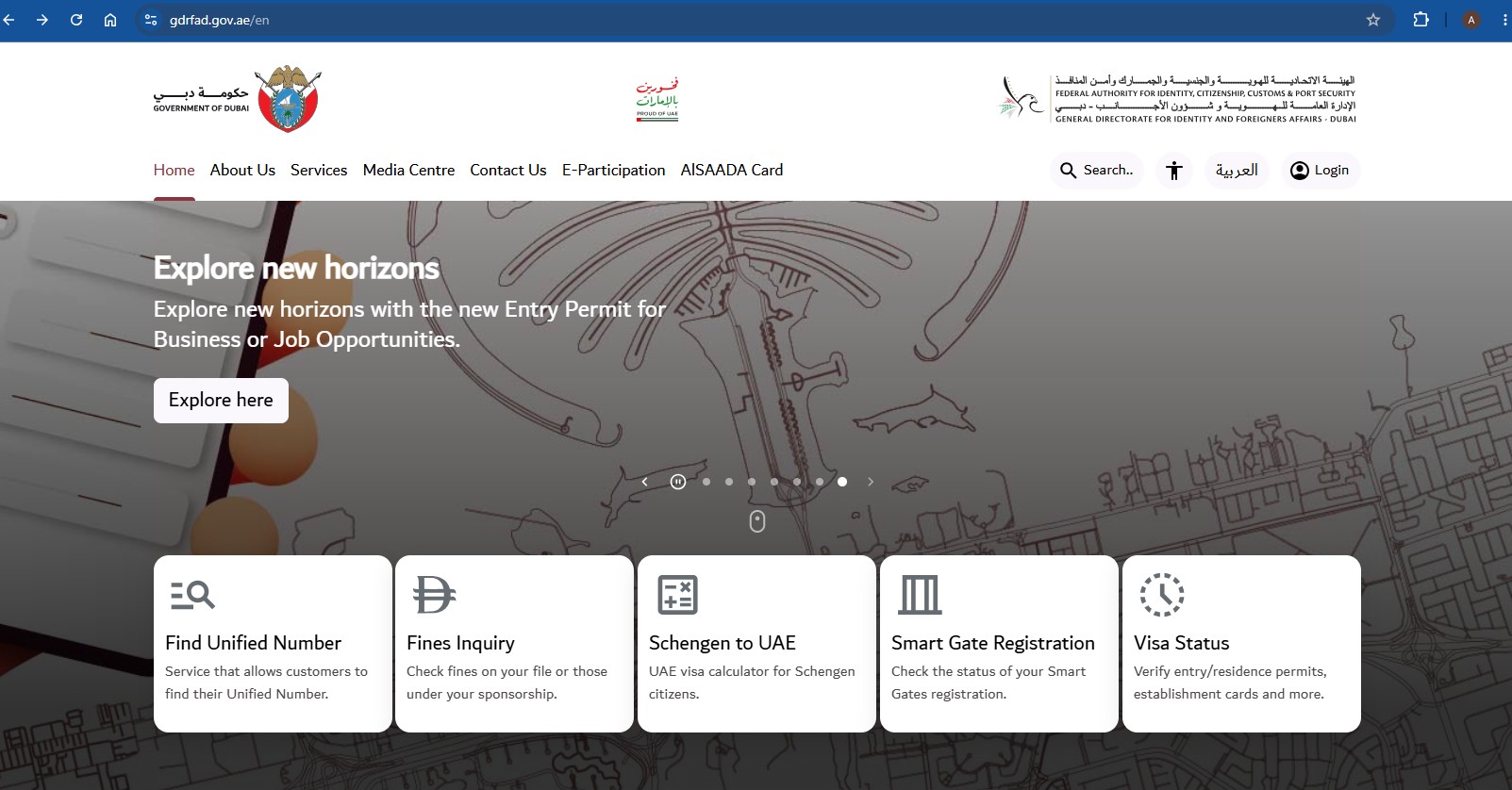
GDRFA Dubai homepage (gdrfad.gov.ae) with the Visa Status card among the quick services
The "Visa Status" card on the GDRFA Dubai homepage
Official source: Always confirm the latest requirements on the official website: GDRFA Dubai gdrfad.gov.ae.

What you need

  • Your Dubai file number (as printed on the entry permit or residence visa)
  • First name in English, exactly as it appears on your passport
  • Nationality
  • Date of birth

Step-by-step check

  1. Go to gdrfad.gov.ae and open the "Visa Status" card on the homepage, or go directly to the Status Tracking service.
  2. Under "Search by," pick the option that matches your document — File covers most entry permits and residence visas. Application, Over the Counter Service Applications, Establishment, and Application for Reconsideration are also available for other transaction types. If you are tracking a freshly submitted application using an application and transaction number instead, follow our <a href="/uae-guides/gdrfa-application-status/">GDRFA application status guide</a>.
  3. Enter the First Name (English), File Number, Nationality, and Birth Date exactly as they appear on your document.
  4. Tick "I'm not a robot" and click Search.
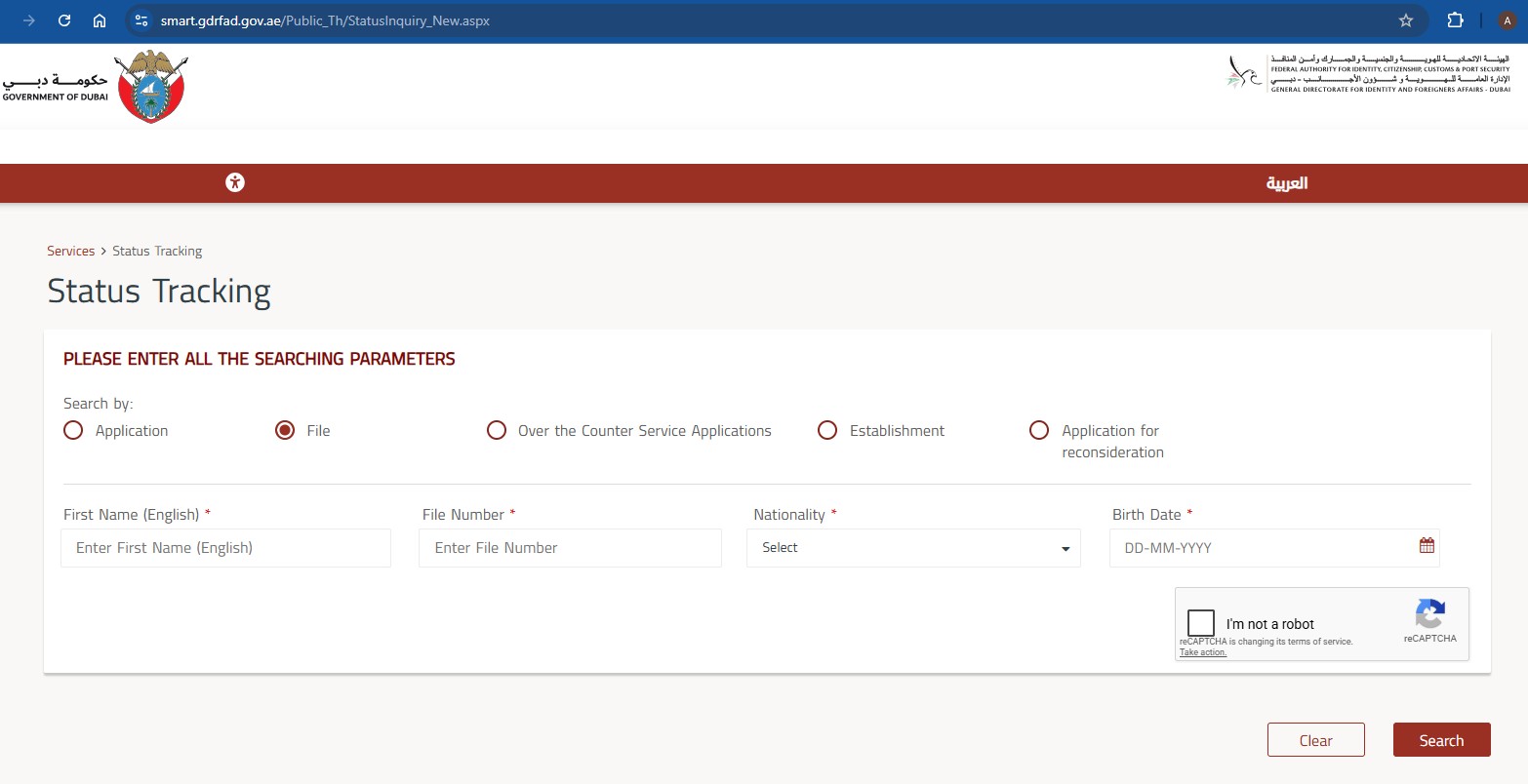
GDRFA Dubai Status Tracking form with Search by options and the First Name, File Number, Nationality and Birth Date fields
The Status Tracking form at smart.gdrfad.gov.ae

Reading the results

  • Approved — proceed to the next stage (entry, medical, stamping)
  • Under process — normal for a few working days
  • Requires modification — a document or detail needs fixing
  • Not found — check the details you typed, or confirm you selected the right "Search by" option
Common mistake: picking the wrong "Search by" option. Use File for an entry permit or residence visa file number, Application if you only have an application/transaction number, or Establishment for a company file.

Conclusion

For Dubai files: GDRFA portal, file number and applicant details, instant result. If the status needs action — modification, renewal, or cancellation — our GDRFA Dubai application support handles the typing through the correct channels.

Related guides: GDRFA Application Status · GDRFA Login Guide · ICP Status Check · ICP vs GDRFA Dubai · Check UAE Visa Status

Frequently asked questions

What is GDRFA Dubai?
The General Directorate of Residency and Foreigners Affairs is Dubai's residency authority, handling entry permits, residence visas, renewals and cancellations for Dubai-sponsored files.
How do I check my Dubai visa status?
Use the GDRFA Dubai website or smart app, enter your file/permit number or passport details in the status inquiry service, and submit.
Where do I find my Dubai file number?
It is printed on your entry permit or residence visa, usually in a segmented format that the inquiry form asks you to enter field by field.
My visa was issued in Sharjah — can I check it on GDRFA?
No. Only Dubai-issued files appear on GDRFA Dubai. Other emirates use the ICP platform.
What is the Amer service?
Amer centers are Dubai's authorised service centers for GDRFA transactions — application typing, submissions, and inquiries are handled through them.
Disclaimer: Bab Al Zahiah Typing Center is an independent professional service provider. We are not a government authority. Information on this website is provided for general guidance only and should be verified with the relevant UAE government authority before making decisions. Approval, rejection, timelines, fees, and requirements are controlled by the relevant authority.

Want help with this process?

Skip the confusion. Send your case on WhatsApp and get the document checklist for your situation.

Call +971 52 121 2397

Related guides

GDRFA Application Status: How to Check Your Dubai Visa Application Online

Track a GDRFA Dubai application by Application Number and Transaction Number, or by File Number — which search option to use, where to find each number, and what every result means.

Read more →

ICP Visa Status Check: Complete Guide

Step-by-step guide to checking visa and application status on the ICP platform — for Sharjah, Abu Dhabi, Ajman, RAK, UAQ and Fujairah files.

Read more →

How to Check UAE Visa Status Online

Check any UAE visa or application status in minutes — which portal to use (ICP or GDRFA Dubai), what you need, and what each status means.

Read more →

Related services

Visa Status Check UAE

Check your UAE visa or application status through ICP or GDRFA Dubai. We check, explain the result, and tell you the next step.

Read more →

GDRFA Dubai Application Support

Typing and support for GDRFA Dubai applications — entry permits, residence visas, renewals and cancellations through the correct Dubai channels.

Read more →

Health Insurance for UAE Visa

Health insurance requirements for UAE visas explained — what sponsors and companies need, and guidance toward compliant plans.

Read more →