GDRFA Application Status: How to Check Your Dubai Visa Application Online
If you have submitted a Dubai visa or entry permit application and want to know where it stands, GDRFA lets you track it in under a minute — with no account and no login. The only thing you have to get right is which search option you pick, and which numbers go with it. This guide covers both routes exactly as they appear on the live portal.
If your status shows a problem and needs action, our GDRFA Dubai application support handles the correction and resubmission for you.
Where to check
Open the GDRFA Status Tracking service at smart.gdrfad.gov.ae, reachable from the Visa Status card on the gdrfad.gov.ae homepage. The page is titled "Status Tracking" and asks you to enter all the searching parameters. No sign-in is needed — if you were about to create an account just for this, you do not need one. Our GDRFA login guide covers when an account actually is required.
The five "Search by" options
Before entering anything, you choose one of five options. Picking the right one matters more than anything else on the page:
- Application — for a recently submitted application, using the application and transaction numbers from your receipt
- File — for an existing entry permit or residence visa that has a file number
- Over the Counter Service Applications — for transactions submitted in person at a service counter
- Establishment — for company files rather than individual ones
- Application for reconsideration — for a case submitted for review after a rejection
Most people need either Application or File. The two sections below cover exactly what each one asks for.
Option 1: check by Application Number
Choose this if you have just submitted and hold a receipt or payment confirmation. The form asks for three required fields:
- Application Number — from your submission receipt
- Transaction Number — also on the same receipt or payment confirmation
- Payment Date — the date the fee was paid, entered as DD-MM-YYYY
All three must match the same transaction. Then tick "I'm not a robot" and click Search.
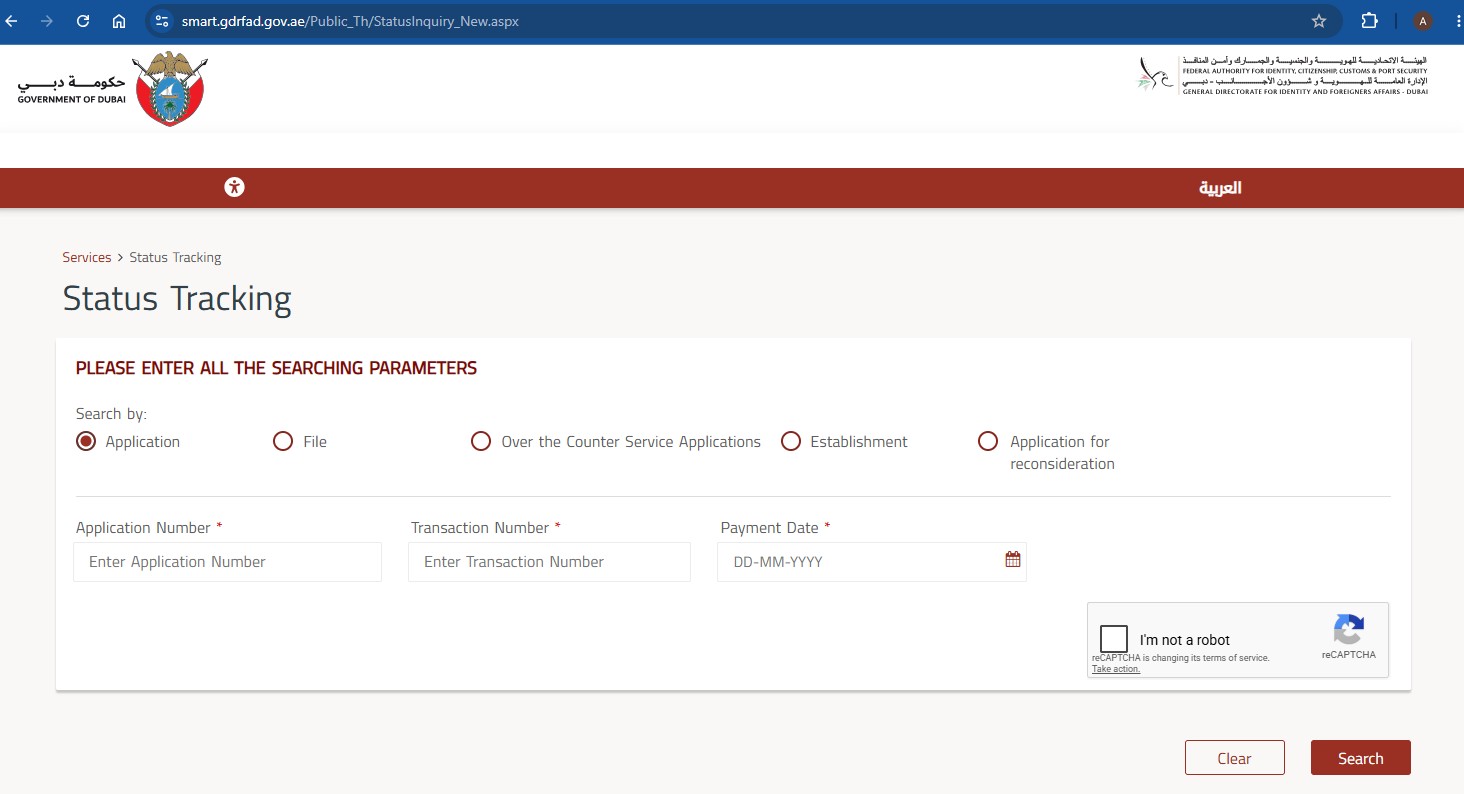
If a typing centre or Amer centre submitted the application on your behalf, these numbers are on the receipt they issued — ask them for it rather than guessing, because a partial match returns nothing.
Option 2: check by File Number
Choose this if you already hold an entry permit or residence visa with a file number printed on it. The form asks for four required fields:
- First Name (English) — exactly as printed on your passport
- File Number — as printed on the entry permit or residence visa
- Nationality — selected from the dropdown list
- Birth Date — entered as DD-MM-YYYY
Tick the reCAPTCHA box and click Search.
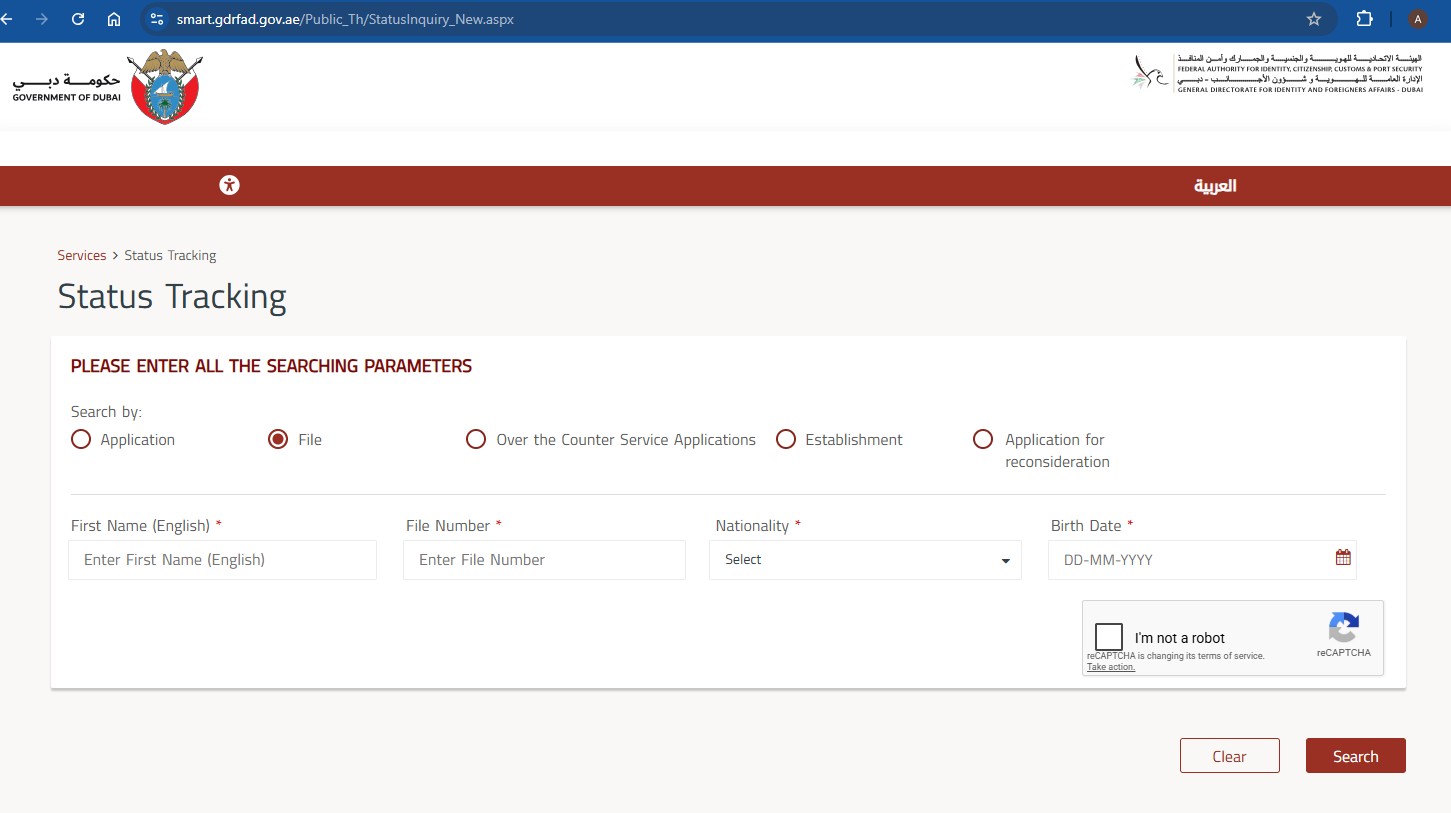
For a fuller walkthrough of this route, including where the file number sits on the document, see our GDRFA Dubai visa status check guide.
Getting the details exactly right
The form is strict, and small mismatches are the usual cause of a failed search:
- Enter dates in DD-MM-YYYY order, using the calendar picker rather than typing where possible
- Use your first name only in the First Name field, spelled as it appears in the passport — not a shortened or preferred name
- Enter the file number in the segmented format the form expects, field by field
- Select nationality from the dropdown rather than assuming it is prefilled
- Every field marked with a red asterisk is mandatory; a blank one blocks the search
Reading your result
- Approved — the application has cleared; move to the next stage such as entry, medical, or stamping
- Under process — still with the authority, which is normal for a few working days
- Requires modification — a document or detail needs correcting before it can proceed; act quickly, as applications can expire
- Rejected — the application was refused; reconsideration may be possible in some cases
- Not found — almost always a search input problem rather than a missing application
What to do if the status needs action
A "requires modification" status is time-sensitive — the application pauses until the fix is submitted, and waiting too long can mean starting over. Identify exactly which document or detail is flagged, correct it, and resubmit through the proper channel. If you are unsure what is being asked for, our GDRFA Dubai application support reviews the file and handles the resubmission.
If your application is not a Dubai file
GDRFA tracks Dubai-issued files only. For Sharjah, Abu Dhabi, Ajman, Ras Al Khaimah, Umm Al Quwain and Fujairah, the equivalent service is on the ICP platform — see our ICP status check guide, or our ICP vs GDRFA Dubai comparison if you are unsure which authority holds your file.
Conclusion
Checking a GDRFA application status is quick once you match the search option to the document in your hand: Application plus Transaction Number and Payment Date for a fresh submission, or File Number with your name, nationality and birth date for an existing permit. No login, no fee, instant result. If the status comes back needing a modification, message our GDRFA Dubai application support and we will correct and resubmit it properly.
Related guides: GDRFA Dubai Visa Status Check · GDRFA Login Guide · How to Check UAE Visa Status Online